
How to make a skincare product inventory before you buy more
A useful inventory does more than count bottles. It tells you what each product does, where it belongs, when you opened it, and whether another purchase would fill a real gap.

The short version: list every product, copy its label directions, record when it was opened, assign it to a routine or backup category, and write one rule for buying a replacement. The goal is clarity, not a longer routine.
Your copyable skincare inventory
Copy this into a note or print this page, then replace the prompts with your own details. This is a planning worksheet, not an automatic app import.
| Field | What to write |
|---|---|
| Product and role | Exact name from your bottle |
| AM / PM / backup | Your chosen slot |
| Opened date or unknown | Do not guess a date |
| Printed expiry / PAO | Copy the label |
| Active / paused / finished | Choose one status |
| Next purchase decision | Use existing backup first |
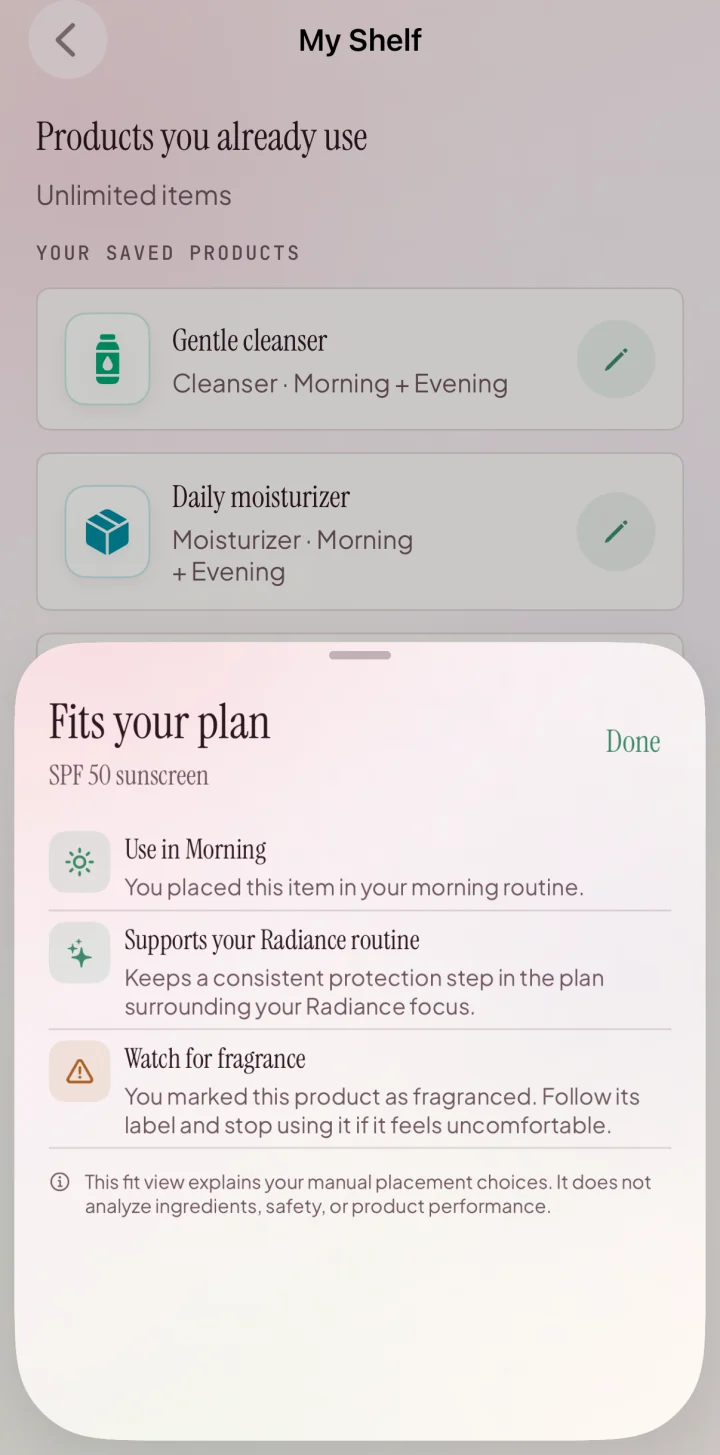
Add the product name, category, routine placement and fragrance flag manually in My Shelf. Keep opening dates, expiry information, quantities and purchase decisions in your own note or worksheet: My Shelf does not store those fields or automate reorders.
See this GlowKit feature, or download GlowKit for iPhone to keep your routine close at hand.
On this page
A crowded skincare shelf creates two kinds of guesswork. You may forget what is already open, and you may buy a new product without knowing which existing product it would replace. A product inventory makes both decisions visible.
This is different from a routine order. Order answers “what comes next?” An inventory answers “what do I own, what is active, and why is it here?” When those questions are separated, it becomes easier to keep a routine simple and to notice when several products are competing for the same job.
Why make a skincare inventory?
An inventory is useful when you have half-used products in more than one room, backups you forgot you bought, or several bottles described with similar marketing language. It gives you one calm view before you reorganize or shop.
The practical benefits are straightforward:
- see which products are open, unopened, active, paused, or finished;
- find duplicate routine roles before adding another product;
- keep label directions and warnings attached to the correct item;
- record printed expiration or period-after-opening information without guessing;
- connect routine changes to a date instead of relying on memory;
- build a replacement rule around what you use, not what is trending.
An inventory cannot tell you that two products are medically compatible or that a cosmetic claim will produce a particular result. It is an organization tool, not a safety test or diagnosis.
The seven fields worth recording
You do not need a complicated spreadsheet. A note, table, or product card works if every item uses the same fields.
- Product name: record the brand and exact product name so similar bottles do not blur together.
- Product role: use one plain-language role such as cleanser, moisturizer, sunscreen, makeup remover, or optional cosmetic step.
- Routine slot: morning, evening, either, occasional, backup, or not assigned.
- Label directions: copy the placement, frequency, time-of-day language, and important warnings instead of rewriting them from memory.
- Opened or acquired date: write the exact date if known; otherwise mark it as an estimate rather than inventing precision.
- Printed date or symbol: record an expiration date or period-after-opening symbol exactly as it appears. Do not create a universal deadline for products that do not show one.
- Status and next decision: active, paused, backup, finish first, replace when empty, or review before buying again.
Copy-ready product card:
Product — Role — Routine slot — Label directions — Opened/acquired — Printed date or symbol — Status/next decision.
The FDA notes that cosmetic shelf life varies with the product, use, and storage, and that U.S. cosmetics are not universally required to carry expiration dates. That is why an inventory should preserve the information actually printed on a product and avoid pretending every jar follows the same countdown.
A 20-minute shelf audit
1. Gather products from every routine location
Check the bathroom, bedroom, travel bag, desk, and unopened backups. Keep ordinary skincare separate from prescriptions or professionally managed products so a cosmetic reorganization does not overwrite established directions.
2. Photograph the front and information panels
A quick photo preserves the exact name, directions, ingredient list, warnings, and printed date. Make sure the text is readable. The photo is a reference, not permission to discard the original packaging when the product needs it.
3. Fill the seven fields without evaluating results
The first pass is a factual inventory. Do not decide that a product “works” because of one good day or that it “failed” because of one inconsistent photo. Record what it is, how it is directed, and where it currently sits.
4. Mark duplicates by role
If three open products all occupy the same routine slot, mark them as a group. You do not need to rank them immediately. The important fact is that they are competing for one job.
5. Choose one next action per item
Use a small action vocabulary: keep active, finish first, move to backup, pause, replace when empty, or review the label. Avoid vague labels such as “maybe useful.” A clear next action is what turns a list into a decision tool.
Sort by status, not by aspiration
Sorting every product by category can still leave you with a shelf full of choices. Status creates a more useful physical layout:
- Active routine: products with a defined job and current place.
- Backups: unopened replacements for an active product.
- Paused: products intentionally outside the current routine while you keep other variables stable.
- Needs review: products with unreadable directions, unknown dates, damaged packaging, or an unclear role.
- Finished or no longer usable: empty products and items you have decided not to keep using according to their labels or manufacturer guidance.
Keep the active routine easy to reach and the paused group out of the daily decision path. This reduces random rotation without forcing you to throw away every optional product during the audit.
Use the inventory before buying more
Before adding a product to your cart, compare it with the inventory and answer five questions:
- Which exact role would this product fill?
- Do I already have an active or unopened product in that role?
- Which product would leave the routine if this one entered?
- Have I read the full directions, warnings, amount, and product identity rather than only the front-label claim?
- Will I be able to keep the rest of the routine stable enough to understand the change?
If the new item has no clear role or replacement plan, save it to a later list instead of making it part of today's routine. The skincare label guide can help separate required information from broad marketing language before you buy, while the skincare cost-per-use guide turns completed-use and finish-date history into a clearer replacement budget.
A simple replacement rule
Write one rule for each core role: “Buy a replacement when the active product is nearly finished and no unopened backup exists.” Optional products can use a stricter rule: “Add only when the inventory has a defined gap and the routine can remain otherwise stable.”
These rules are not moral judgments about owning skincare. They simply move the decision from an ad or trend into a list you control.
Keep it useful without daily admin
Update the inventory at moments that already create a change:
- when you open a product;
- when you move a product into or out of the active routine;
- when a product is finished or replaced;
- before a larger skincare purchase;
- during a monthly shelf check.
You do not need to log every application. A low-maintenance inventory should explain the current routine and its recent changes at a glance. If it becomes another daily burden, remove fields until it supports decisions again.
When you do change the routine, note one meaningful date and keep other variables understandable. The routine-change tracking guide explains how to maintain a baseline without treating every photo as a verdict.
Where GlowKit fits
Add the product name, category, routine placement and fragrance flag manually in My Shelf. Keep opening dates, expiry information, quantities and purchase decisions in your own note or worksheet: My Shelf does not store those fields or automate reorders.
GlowKit organizes cosmetic routines and progress. It does not replace product directions or establish that a product caused a visible change. See current free and Pro features.
- See how the guided GlowKit scan flow works.
- Use the scan consistency checklist.
- Read how GlowKit handles scan photos and account data.
- Browse all GlowKit guides.
Related guides
Calculate skincare cost per use
Use price paid, completed uses, finish dates, and routine context to estimate product and monthly costs.
Use the inventoryPut skincare products in a practical order
Turn label directions and clear product roles into separate morning and evening routines.
Reduce the active setHow to simplify a skincare routine
Keep the core, pause duplicate products, and create a calmer baseline from what you already own.
FAQ
What should a skincare inventory include?
Record the exact product name, one plain-language role, its morning or evening slot, label directions, opened or acquired date, any printed expiration or period-after-opening information, and one status or next decision.
Do all skincare products have expiration dates?
No universal rule requires every U.S. cosmetic to print an expiration date. Record the date or period-after-opening symbol actually shown, keep the product's directions and storage guidance, and contact the manufacturer when information is unclear.
Should I throw away every duplicate product?
No. The inventory can separate an active product from unopened backups and paused items. The useful step is to stop several products from competing for the same routine slot without a clear reason.
Can GlowKit tell me which products are medically safe together?
No. GlowKit supports cosmetic and general wellness guidance, routine organization, and progress tracking. Follow product directions and seek qualified advice for medical or individual safety questions.