
How to make a skincare routine checklist you will actually use
A useful skincare checklist separates the routine you repeat from the changes you review. Keep the daily layer short, place optional steps on purpose, and let product directions define the details.

The short version: write one morning list, one evening list, and one small scheduled list. Give every line a product, timing cue, and label-based instruction. Record changes separately so the checklist stays stable enough to use.
A beauty routine checklist you can copy today
Copy this into a note or print this page, then replace the prompts with your own details. This is a planning worksheet, not an automatic app import.
| Field | What to write |
|---|---|
| When | Morning / evening / scheduled |
| Exact product / step | Use your current plan |
| Directions to follow | Copy the product label |
| Today | Done / skipped / not scheduled |
| Change note | Date and reason, only if changed |
Open your Routine in GlowKit to review morning and evening steps, edit the plan and mark completed steps. The worksheet below is a separate planning aid: fill it with the products and directions you already use rather than treating the example as a recommended routine.
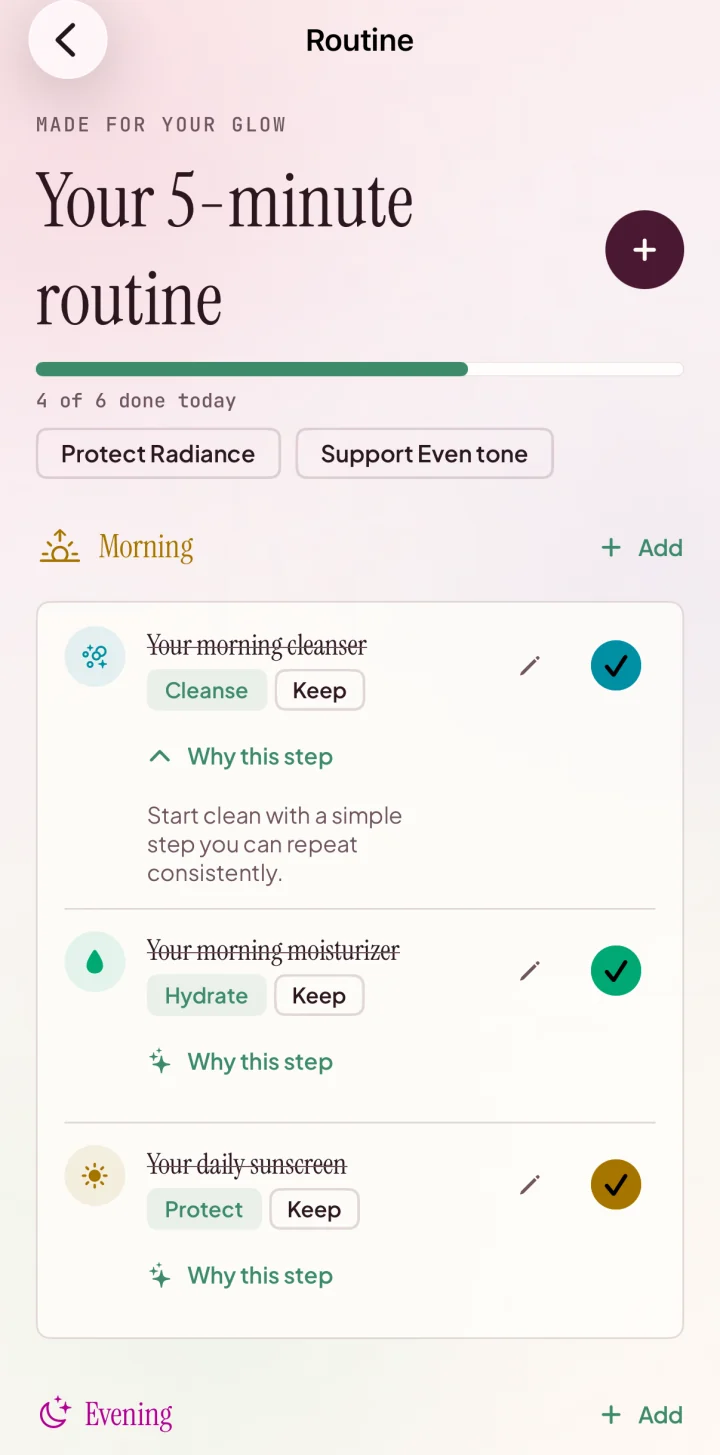
See this GlowKit feature, or download GlowKit for iPhone to keep your routine close at hand.
On this page
Searching for a skincare routine checklist often leads to a universal sequence with many empty boxes. It may look organized, but it still leaves the important decisions unresolved: which exact product belongs on each line, when the line applies, what the package says, and what happens when the routine changes.
A better checklist is personal without pretending to be medical. It turns products you already chose into a repeatable plan, preserves the directions that matter, and keeps optional steps from quietly becoming obligations. The goal is not to check the most boxes. The goal is to know what the current routine is and make it easier to follow consistently.
What a routine checklist is for
A routine checklist is an execution view. It answers: what belongs in this routine, in what practical sequence, and under what condition? That makes it different from three related tools:
- A product inventory records everything you own, including backups, paused products, and items that do not belong in the current routine.
- A routine-order guide helps you arrange categories and label-directed steps, but it is not your finished list of exact products.
- A change tracker records when a product entered, left, or moved in the routine and what you observed over time.
Trying to combine all three jobs into one daily screen usually creates too many fields. Keep the checklist focused on action. Link out to the inventory for product facts and to the change log for history.
What do I do now?
Shows the active morning, evening, or scheduled steps in a usable order.
What changed, and when?
Preserves dates and notes without making the daily checklist longer.
Collect the source facts first
Before arranging the routine, read the package and the information supplied with each product. Marketing names such as “daily glow serum” or “night renewal cream” do not replace actual directions. Copy only the facts needed to use the product correctly:
- the exact product name and form;
- the directions for use and any timing language;
- warnings or restrictions printed on the package;
- whether the product belongs in the morning, evening, either, or a specific schedule;
- any amount, reapplication, storage, or follow-up instruction you need to remember.
Do not copy a long ingredient panel into the checklist. Keep that with the product record or product inventory. The checklist needs the instruction that changes what you do, not every fact available about the bottle.
If two directions are difficult to reconcile, pause the guesswork. A generic online sequence should not overrule the product's own warnings or individual guidance from a qualified professional.
Build separate morning and evening lists
One combined list forces you to remember which lines apply at which time. Split the plan before you refine it. Start with the routine you already follow rather than the routine you imagine maintaining next month.
Morning checklist
- Write the stable core. Add only the steps that genuinely belong in the current morning routine.
- Use the exact product name. “Moisturizer” may be enough when there is only one; otherwise name the product so you do not improvise.
- Add one timing cue where needed. Examples include “after cleansing,” “before makeup,” or the label's own timing language.
- Keep sunscreen directions visible. Follow the product label for use, amount, timing, water resistance, and reapplication rather than compressing all of that into a generic “SPF” box.
Evening checklist
- Account for removal and cleansing. The exact steps depend on what you wore and the directions of the products you use.
- Assign optional products deliberately. If a product is not meant for every evening, keep it out of the daily baseline and place it in the scheduled layer.
- End with a clear completion point. A checklist is easier to maintain when you know where the routine ends.
The label-first routine-order guide provides a fuller ordering framework. Your checklist is the shorter, product-specific version you use after those decisions are made.
Place scheduled and optional steps without calendar noise
Some products or maintenance tasks do not belong in every morning or evening. Avoid scattering them across the daily list with vague labels such as “sometimes” or “when needed.” Give each one a clear condition.
- Specific day: useful when the product's directions and your established plan call for a predictable schedule.
- Specific context: for example, a travel version of the routine or a makeup-removal branch.
- Paused: keep the product in the inventory, not as an unchecked item that follows you every day.
- Not assigned: a product can remain outside the routine until there is a clear role for it.
Optional does not mean inferior, and daily does not mean better. These labels describe the plan, not the value of a product. If the scheduled layer becomes longer than the daily layer, review whether duplicate jobs or overlapping experiments have entered the routine.
If those steps rotate across several days, move the day-by-day pattern into a separate weekly skincare routine plan. The checklist should still answer what to do now; the weekly view should explain what changes and how a missed slot is recorded.
A five-field skincare checklist template
You can build the checklist in a notes app, on paper, or in a routine tool. Five fields are enough for most practical decisions:
Step + product
Number the practical sequence and name the exact product or stable category used at that step.
When + direction
Mark morning, evening, or schedule, then preserve the shortest label-based instruction that affects use.
Status
Use active, scheduled, paused, or not assigned. Avoid silently deleting the history of a change.
Copyable structure: “1. [Product] — [morning/evening/schedule] — [short direction] — [active status].” Keep change dates and observations in a separate note linked to this routine.
Checkboxes are optional. If checking every application creates more pressure than clarity, use the list as a reference instead. Consistency can be reviewed through meaningful routine records rather than a perfect streak.
How to review without rewriting it daily
A checklist should be stable enough that a missed box does not trigger a redesign. Review the structure when one of these events occurs:
- a product enters or leaves the active routine;
- the product's directions or your established instructions change;
- a scheduled step repeatedly gets skipped because its role or timing is unclear;
- travel, season, availability, or another practical context requires a separate routine version;
- the checklist no longer matches what you actually do.
When you edit it, record the date and the one meaningful reason. Then keep the rest stable long enough to understand the new baseline. The routine-change tracking guide explains how to separate a stable baseline from the variable you are reviewing.
For a lightweight daily history, use the skincare routine journal guide to separate the stable checklist from actual use, meaningful context, cosmetic observations, and review decisions.
For visual progress, compare photos under similar conditions instead of using a checkbox streak as proof of a cosmetic outcome. Use the progress-photo checklist for steadier lighting, framing, distance, and timing.
Checklist mistakes that create more noise
- Copying a stranger's routine. A complete-looking template may not match your products, directions, preferences, or established guidance.
- Listing every owned product. Backups and paused items belong in the inventory, not in today's routine.
- Using category names that hide a choice. If you own several products in one category, name the active one.
- Turning optional steps into permanent obligations. Assign a reason and condition or remove the line from the active list.
- Changing the checklist and the products at the same time. Record what changed so a cleaner layout does not erase the timeline.
- Treating completion as medical evidence. A checklist records behavior; it does not diagnose a condition or prove that one product caused a visible change.
Where GlowKit fits
Open your Routine in GlowKit to review morning and evening steps, edit the plan and mark completed steps. The worksheet below is a separate planning aid: fill it with the products and directions you already use rather than treating the example as a recommended routine.
GlowKit organizes cosmetic routines and progress. It does not replace product directions or establish that a product caused a visible change. See current free and Pro features.
- See how the guided GlowKit scan flow works.
- Use the scan consistency checklist.
- Read how GlowKit handles scan photos and account data.
- Browse all GlowKit guides.
Related guides
Plan rotating steps without losing track
Separate daily anchors, rotating slots, skipped steps, and actual use in a calendar that can survive real life.
Before the checklistPut your skincare routine in a practical order
Use product directions to separate morning, evening, and optional steps before writing the active list.
After the checklistTrack changes without changing everything
Keep one baseline, one meaningful variable, and a timeline that is easier to interpret.
FAQ
What should a skincare routine checklist include?
Include the practical step order, exact active product, morning or evening timing, the shortest relevant direction from the product label, and an active or scheduled status. Keep full product facts and change history in separate records.
Should morning and evening skincare be on separate lists?
Usually, yes. Separate lists reduce the need to remember which lines apply at which time and make scheduled or optional steps easier to place deliberately.
Do I need to check off every skincare step every day?
No. Use checkboxes only if they improve clarity. The same structure can work as a reference list, while meaningful changes and comparable progress records are reviewed separately.
Can GlowKit create medical treatment plans?
No. GlowKit supports cosmetic insights, routine guidance, product guidance, and progress tracking. It does not diagnose, prescribe, or replace product directions or qualified medical advice.